AI Home Design - Decor
- 4.7
- Rating
- 10.00K
- Installs
- Free
- Price

 Analysis by App-foxy
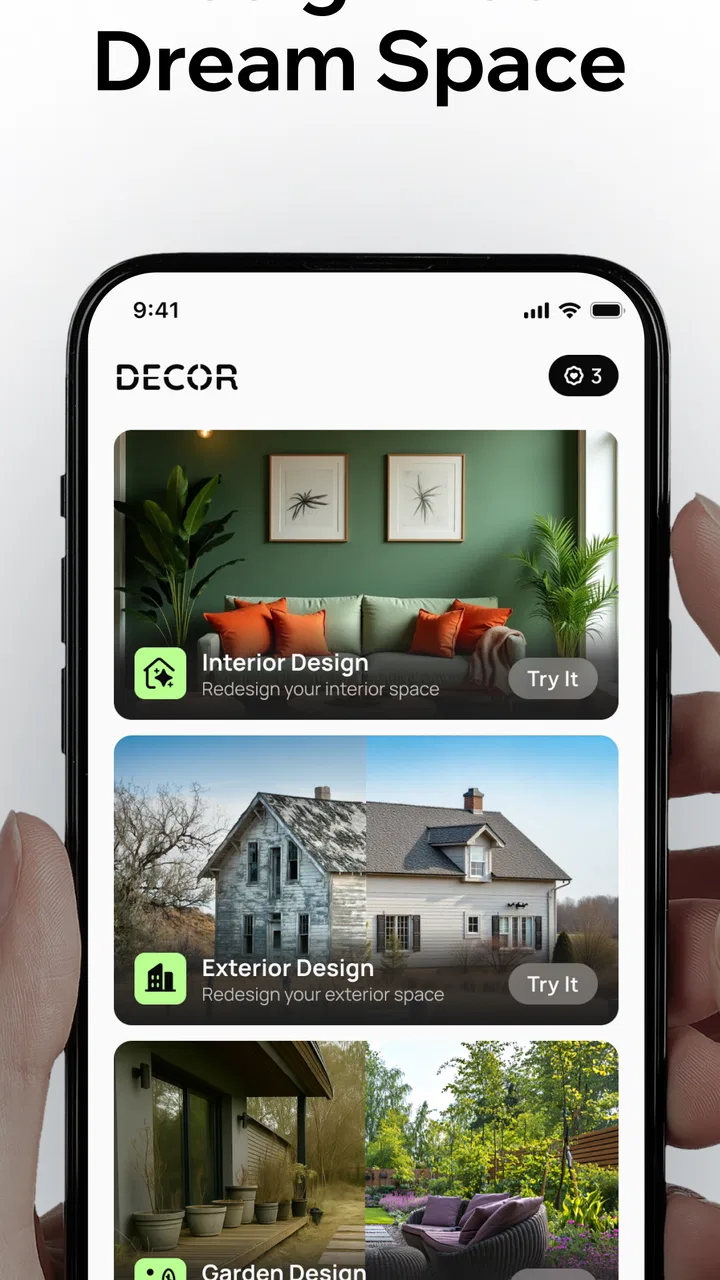
I found AI Home Design - Decor most useful as a quick visual thinking tool rather than a complete replacement for an interior designer. The idea is simple: take a photo of a room, let the app reinterpret it, and use the results to explore different directions before buying furniture, changing colors, or discussing a renovation. In my experience, that makes it especially appealing when I know a room feels wrong but cannot yet explain what I want to change.
This is a free House & Home app from Fenix Mobile, with optional purchases ranging from $2.99 to $39.99 per item. It is suitable for Everyone, runs on Android 7.0 and later, and is currently at version 2.5.0. The app has built a 4.7 average from around 1.1 thousand ratings and has passed 10 thousand installs, which gives it a useful level of early visibility without making it feel like an overcrowded platform.
What matters most here is how you use the images. I would not treat every generated room as a prediction of exactly what my home will look like. I see it as a fast way to compare moods, layouts, and decorating styles. That distinction helps set realistic expectations from the start and makes the app much more valuable.
You May Also Like

 AccuWeather: Weather Radar
AccuWeather Review: A Quick, Clear Forecast for Everyday Decisions
For everyday plans, the best forecast is the one you can understand quickly. AccuWeather makes rain timing, radar, and local conditions easy to act on, with a few trade-offs.

 Hill Climb Racing
Why Hill Climb Racing Still Turns Crashes Into One More Run
A tiny car, a bumpy hill and one more upgrade: Hill Climb Racing keeps resurfacing because its simple chaos makes every near-miss feel personal.

 AliExpress - Shopping App
AliExpress Makes Global Shopping Feel Personal, but Shoppers Bear the Risk
AliExpress turns a global marketplace into a pocket-sized discovery engine. Its reach is useful, its shopping loop compelling, and its trade-offs easy to miss.

 Lords Mobile: Kingdom Wars
Lords Mobile Is a Kingdom-Building Routine, Not a Quick Match
A case-by-case verdict on the building, battles, device demands, and social commitments that make Lords Mobile rewarding for some players and exhausting for others.

 PDF Scanner app - TapScanner
TapScanner Makes Paperwork Easier to Capture, Check, and Share
TapScanner makes scanning with a phone feel less like a rescue operation and more like a dependable step in getting work done. Its capture tools are useful, though not flawless.

 Block Blast!
 Shows How Much a Puzzle Game Can Leave Out
A quiet grid game shows why puzzle players increasingly value instant clarity, repeatable skill and low-pressure play—and where the genre still needs to catch up.
More From Our News Desk
View All News


How the redesign process feels in everyday use
I approach the redesign as a visual experiment, not a promise that the finished room will match the image. In this section, I focus on how a photo-based workflow can help me compare ideas while keeping practical decisions grounded in the space I actually live in. That distinction matters even more when a room photo includes personal details, so next I consider what I can responsibly verify about trust and control.
Fast ideas are the main attraction
The strongest part of the experience is the short distance between a real room and a visual suggestion. Instead of opening a blank design canvas and manually adding walls, flooring, sofas, lamps, and decorations, I can begin with the space already in front of me. That is a much friendlier starting point for someone who wants inspiration but does not know how to use professional design software.
A practical example would be a living room that feels too dark. I could photograph it during the day, then use several visual directions to decide whether the problem is better addressed with lighter walls, warmer furniture, a simpler arrangement, or a different decorative style. The result does not make the decision for me, but it gives me something concrete to react to. That is often easier than trying to imagine a finished room from a written description.
I also like this approach for early conversations with another person. If two people disagree about whether a room should feel modern, comfortable, minimal, or more colorful, a few generated versions can turn an abstract argument into a comparison. It is easier to say “this one feels too cold” when there is an image on screen than to explain that reaction from scratch.
The best use of the app is narrowing choices, not approving a final purchase. Generated images can be persuasive, but they do not replace checking measurements, materials, lighting at different times of day, or the practical needs of the people using the room.
What to do before taking a room photo
The quality of the starting photo has a major effect on how useful the redesign feels. I would take the picture with the room reasonably tidy, include as much of the floor and walls as possible, and avoid blocking the main furniture with bags, laundry, or temporary clutter. This is not about making the room look perfect; it is about giving the visual process a clear foundation.
Lighting deserves attention too. A very dark evening photo can make a room seem smaller and heavier than it feels in person, while strong sunlight can hide the actual wall color. For a more balanced comparison, I would take one image in ordinary daylight and keep the camera position similar when testing different ideas. That makes the variations easier to judge because the room itself has not changed between attempts.
A non-obvious advantage of photographing the same space from more than one useful angle is that it helps separate a style preference from a camera illusion. One view may make a sofa appear perfectly placed simply because the doorway is hidden. A second view can reveal whether the proposed look still makes sense for movement through the room. I would use the app for visual exploration, then inspect the real space from the walking paths that matter.
Comparing styles without losing the room’s identity
It is tempting to choose the most dramatic result, especially when a plain room is transformed into something polished and highly decorated. I found a better method is to compare the images in groups. First, look only at the overall atmosphere: light, warmth, calmness, or energy. Then look at practical elements such as seating, storage, open floor area, and whether the room still resembles the home you actually want to live in.
This two-stage comparison prevents a common mistake. A design can look attractive while being completely unsuitable for the room’s purpose. A family living room needs usable circulation. A bedroom may need visual calm rather than a striking arrangement. A small hallway needs restraint more than a collection of impressive objects. The app can suggest a direction, but I still have to judge whether the direction fits daily life.
I would also save the strongest ideas in a simple sequence: one image for the color mood, one for furniture placement, and one for decorative details. That is more useful than trying to copy one generated picture item by item. It turns the app into a reference board and reduces the pressure to reproduce an entire scene that may contain objects or proportions I cannot realistically match.
Where the experience may feel slower or heavier
Image-based design is naturally more demanding than a basic notes or shopping app. The work involves processing a room photograph and producing a new visual result, so I would expect the waiting time to vary with the phone, the connection, and the complexity of the request. I would not judge the app by the speed of opening a screen alone; the important moment is how smoothly it moves from photo selection to a usable result.
For occasional inspiration, a short wait is easy to accept. During a concentrated session, however, repeatedly trying variations can make the process feel less immediate. My advice is to decide what you want to compare before starting: perhaps wall tone, furniture mood, and decorative density. A focused set of attempts is more efficient than changing every possible idea at once.
Heavy use can also make a phone work harder than a normal home catalog. I would avoid running a long design session while the device is already busy with navigation, video, or other image-heavy tasks. Keeping the original room photos organized and closing unrelated apps can make the experience feel more controlled, even though the actual design processing may depend on factors outside the phone.
Stability and recovering from an interrupted attempt
For me, reliability in an app like this is not only about whether it opens. It is also about whether a failed or interrupted attempt leaves me able to continue without rebuilding the whole idea. That is why I would treat the original photo as the important asset and keep a copy in the phone’s gallery before experimenting. If an attempt is interrupted, I can begin again without having to recreate the room image.
I would also review each result before starting another variation. This creates a small but useful recovery habit: keep the source photo, note which style direction produced the promising result, and avoid relying on memory alone. If the app behaves unexpectedly during a busy session, I have not lost the visual reference that matters most.
Another sensible precaution is to test the workflow with one room before committing to a larger decorating project. That gives me a feel for how long I am willing to wait, how convincing the results are for my particular space, and whether the app’s visual interpretation suits my expectations. It is a better approach than assuming every room will produce equally helpful suggestions.
Device limits and who should think twice
The Android requirement is broad enough to include older supported phones, but support alone does not guarantee an equally comfortable experience on every device. A newer phone with more available resources is likely to feel better suited to repeated image work than an older handset that already struggles with large photos. I would especially keep the source images sensible rather than filling the process with unnecessarily huge files.
People using a phone with limited free storage should remember that room photos and generated results can accumulate quickly. I would periodically remove weak variations and retain only the images that help with an actual decision. This is not just tidiness: a smaller, purposeful collection makes it easier to compare ideas and reduces the chance of confusing an early experiment with the direction I really prefer.
The app is also less suitable for users who need precise architectural planning. If I were checking exact cabinet clearances, electrical positions, structural changes, or a measured floor plan, I would choose dedicated design software or work with a professional. A photo-based redesign is valuable for appearance and atmosphere, but it should not be treated as a technical drawing.
Free access and the role of optional purchases
The app is free to install, which makes it easy to try before deciding whether it belongs in a regular decorating workflow. Optional purchases are available, with individual items priced from $2.99 to $39.99. I would approach those purchases carefully and only after testing the basic experience on a room that genuinely matters to me.
The reason is simple: the value depends on how often I decorate, how much I enjoy comparing visual directions, and whether the generated images help me make real decisions. Someone planning one small refresh may find the free starting point sufficient. Someone repeatedly exploring several rooms may value additional options more, but should still judge them against the practical benefit rather than collecting variations for their own sake.
Before paying for anything, I would identify the exact problem I am trying to solve. If I need help choosing between two color families, more experimentation may be useful. If I already know the style and only need accurate furniture dimensions, spending more inside a visual inspiration app is probably the wrong move. That is the clearest trade-off in the pricing model: creative exploration can be enjoyable, but it is not automatically the same as measurable renovation value.
How it compares with familiar alternatives
The usual alternative is browsing furniture catalogs, social media boards, or room photos online. Those sources can provide excellent inspiration, but they often show spaces that have little connection to my own room. This app’s advantage is that the starting point is my actual space, so the ideas feel more personal and immediately relevant.
Another alternative is a traditional room-planning tool. Those tools are better when I need measurements, object placement, and a more controlled representation of the room. They can also demand more time and patience, especially for someone who does not enjoy building a digital model from the beginning. AI Home Design - Decor is more approachable for quick visual questions, while a measured planner is the better choice for accuracy.
Working with an interior designer remains the stronger option for a complicated renovation, an unusual room, or a project where mistakes would be expensive. A professional can ask questions about storage, movement, materials, budget, and long-term use that a photo-based visual tool cannot replace. I would use this app before that conversation to clarify my taste, not as a substitute for professional judgment.
There is also a middle ground: use the app for atmosphere, then use ordinary measuring tools and retailer pages for the practical stage. This combination is more reliable than asking one visual result to answer every question. It lets the app do what it does best while keeping important decisions grounded in the real room.
Who will get the most from it
I think it suits renters who want to explore reversible changes, homeowners deciding between several decorating directions, and anyone preparing to refresh a room without a clear starting point. It can also help when a household has different tastes, because visual comparisons make the discussion less vague.
It is particularly helpful for people who think visually but do not want to learn complex design software. Uploading a room photo is less intimidating than constructing an entire floor plan. The app also works well as a confidence builder: seeing a possible direction can make it easier to choose a paint family, rethink a crowded corner, or decide that a room needs fewer decorative elements rather than more.
I would skip it if my main goal is exact construction planning, product-level shopping accuracy, or a guaranteed representation of how a room will look after renovation. I would also be cautious if I dislike iterative experimentation. The app’s usefulness comes from comparing possibilities, and a person who wants one definitive answer may find the process less satisfying.
My performance verdict
After looking at the complete workflow, I see AI Home Design - Decor as a lightweight decision aid with a strong visual appeal. Its speed is best understood as quick access to ideas rather than instant professional output. Its resource demands are likely to be more noticeable during repeated image work than during ordinary navigation, so older or heavily loaded phones may not deliver the same comfort as newer devices.
Stability matters most when I am working through several variations, and the safest habit is to preserve the original photo and keep the session organized. That simple workflow makes interruptions less frustrating and prevents a promising idea from becoming difficult to recover. The app is easiest to enjoy when I approach it as a series of focused comparisons instead of an endless stream of random redesigns.
The rating of 4.7 and the growing install base suggest that the concept is connecting with many early users, but my recommendation is still based on the kind of problem it solves. It is not a measured planner, a shopping catalog, or a replacement for an experienced designer. It is a convenient way to see my own room through several possible styles before I spend time or money changing it.
I recommend it to anyone who wants practical visual inspiration from a real room photo, provided they keep expectations grounded. Start with one well-lit room, compare a small number of clearly different directions, save the useful results, and verify every real-world decision with measurements. Used that way, the free app from Fenix Mobile can turn an uncertain decorating idea into a much clearer next step.
FAQs for AI Home Design - Decor
01What is AI Home Design - Decor and how does it work?
AI Home Design - Decor is an interior-design app that uses artificial intelligence to help you visualize room makeovers. You can typically upload or capture a photo of a room, select a design style, and let the app generate furniture, color, and decoration ideas. The results are intended as inspiration, so the suggested layouts and products may not always match the exact dimensions or structure of your real space.
02Can I use AI Home Design - Decor without professional design experience?
Yes. The app is aimed at everyday users rather than professional architects or interior designers. Its guided interface makes it possible to experiment with styles such as modern, minimalist, classic, or Scandinavian without knowing specialized design software. You only need a reasonably clear room image and an idea of the look you want. However, some generated concepts may require manual interpretation before you can apply them in a real renovation.
03Is AI Home Design - Decor free to download and use?
The application may be available to download at no initial cost, but access to all features can depend on the current subscription model. AI generations, premium styles, high-resolution exports, or an ad-free experience may be limited to paid plans or in-app purchases. Before starting a trial, check the price, billing period, renewal terms, and cancellation instructions shown in the app store or inside the application.
04Does the app create accurate room layouts and realistic designs?
AI Home Design - Decor can produce attractive and useful visual concepts, but its images should not be treated as precise architectural plans. Artificial intelligence may alter windows, doors, walls, proportions, or existing furniture when processing a photograph. For the best results, take a well-lit, straight-on image with as little clutter as possible. Always verify measurements, materials, and construction requirements independently before purchasing items or beginning work.
05What should I know about privacy when uploading room photos?
Because the app may process uploaded images through online AI services, you should review its privacy policy before submitting photographs. Avoid including people, children, personal documents, addresses, or other sensitive information in the frame. Check whether images are stored, how long they are retained, and whether they may be used to improve the service. Using a cropped, anonymous room photo is a sensible precaution when privacy is important.
Pros
- Quickly generates multiple room design concepts from simple inputs.
- Useful for exploring color schemes
- furniture layouts
- and decorating styles.
- Helps visualize renovation ideas before buying furniture or materials.
- Suitable for both beginners and users without interior design experience.
- Can provide inspiration when you are unsure how to update a room.
Cons
- Generated designs may ignore room measurements or structural limitations.
- Some features or design styles may require a subscription or in-app purchase.
- Results can look generic when prompts or room photos lack detail.
- Furniture shown in concepts may not be available or easy to identify.
- High-quality image generation may require a stable internet connection.

AI Home Design - Decor
Gallery